Showing posts with label Android. Show all posts

Modified Calculator App With Advanced Options Released To The Play Store, Will Become The New Default In CM10


The calculator. Such a trivial part of smartphone software that most of us probably don't spent too much time thinking about its existence. While it can be used for the most basic functions, advanced options beyond that of the stock calculator are sometimes needed.

With that in mind, developer Xlythe yanked the stock calculator from ICS and JB and went to work. He modded it to perform advanced functions - just take a look at the feature list:

  • Addition, subtraction, multiplication, division. Really, if I broke this I'm sure you guys would find a way to give me negative stars.
  • Advanced functions like log, sin, cos and irrational numbers like pi and e.
  • Calculate complex numbers.
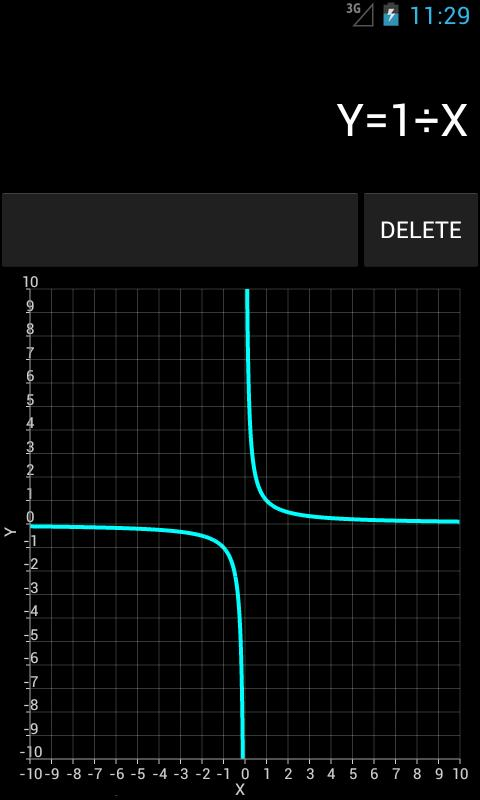
  • Graph X,Y Equations.
  • Matrix addition, multiplication, determinants, and eigen values.
  • Hexadecimal, Binary support
  • Displays history by pulling down from the top
  • Hide the pages you don't need
  • Tablet and Smartphone supported

121[5]

Not only is it chocked full of features, but the app is completely open source. The code can be downloaded from here. The dev has also submitted the app to CM, and it should be merged into nightlies as the default calculator soon.

It's also worth noting, that since this app is based on the Android 4.0/4.1 calculator, it won't work on anything prior to ICS. If you're running 4.0 or higher, however, install away (it install alongside the stock calculator)!

[via Google+]

Verizon's Samsung Galaxy Tab 10.1 Support Docs Updated, Should Finally Be Getting ICS Soon


The support docs for Verizon's variant of the Samsung Galaxy Tab 10.1 have just been updated with details of a new OTA that will bring Ice Cream Sandwich. The update for the Wi-Fi version started rolling out in the US several weeks ago, and T-Mo started pushing the update through Kies to its variant earlier this month.

It's nice to see Verizon make right in a somewhat timely manner, as this update brings some really nice features to the device, and the addition of ICS makes it feel like an entirely new tablet.

image

image

The update hasn't started rolling out just yet, but once the support docs go live, it's only a matter of time before we start to see the OTA pop up on devices. We'll make sure to let you know as soon as it's live.

[Verizon]

Verizon Galaxy SIII Set To Get Software Update To Build I535VRALG7 'Soon' With Improved Connectivity, Bug Fixes, And More


Owners of Verizon's Samsung Galaxy SIII should be keeping an eye out for a software update which VZW says is "coming soon." The update which sadly is not Jelly Bean brings to VZW-connected SIII owners a handful of key improvements, enhancements and bug fixes, and brings the device's software build up to IMM76D.I535VRALG7.

Among the changes included in the 30.7MB update are improved stability and connectivity with Back Up Assistant, the ability to use Verizon Remote Diagnostics, improved S Beam connectivity, an NFC (TecTile) bug fix, and a "No SIM" fix.

image

Verizon hasn't provided a specific time frame for the update just yet, but owners anxious to keep their device's software up to date should keep an eye out for an OTA prompt, and watch Verizon's support page linked below.

Source: Verizon Support

[New Game] Judge Dredd Vs Zombies: No Man Is Above The Law, Even If Hes Already Dead


In case you hadnt heard, theres a new Judge Dredd movie coming out starring Karl Urban (who should know a thing or two about remakes darn it, hes an actor, not a doctor). To build up some mobile hype, a new game has hit the Google Play Store. And since it is a mobile game, old Judge, jury and executioner has come to finish off what plants, samurai and Barry Steakfries couldnt: zombies.

unnamed (3)unnamed (4)unnamed (5)unnamed (6)

Judge Dredd vs Zombies is a rather typical top-down shooter: clear a room of undead crawlers via your gun, exploding barrels, or any other means, and you advance to the next one. For fans of the old Dredd vs Death game, its made by the same developer, and likewise inspired by the comic books and not the movie. Clear the level and you advance through an episode, clear the episode and you advance the story. You can also try an unlimited mode and shoot for achievements. A wide variety of guns and upgrades are bought with currency which can be earned by killing baddies or an in-app purchase.

Theres a lot of advertising for the upcoming Dredd 3D movie, including a (thankfully skippable) full trailer that runs every time you open the app. You can purchase tickets for the movie right from the app which might have been cool if it were integrated with the sometimes dull gameplay. Kill a million zombies and get a buy one, get one free movie ticket, perhaps?

[Deal Alert] Buy The Samsung Galaxy Note 10.1 16GB For $499 At Fry's And Receive A $100 Gift Card (In-Store Only)


If you're in the market for Samsung's Galaxy Note 10.1 even after Ron's in-depth review Fry's may have the deal you've been waiting for. From September 14th to 20th 2012, Fry's brick-and-mortar locations will be offering the Note 10.1 16GB for $499.99, pitching in a generous $100 gift card with purchase.

P4_FRI_091412_09

Just in case you've forgotten, here's a quick run-down of the Note 10.1's specs:

  • Android 4.0 Ice Cream Sandwich
  • 10.1" PLS TFT display at 800x1280 (149ppi)
  • 16GB onboard storage, expandable via microSD
  • 5MP rear camera and 1.9MP front camera
  • Exynos 4412 quad-core processor at 1.4GHz
  • S Pen
  • 7000mAh battery

If you've been waiting to get your hands on the Galaxy Note 10.1, this may be your chance. Of course the $100 gift card is only applicable to Fry's merchandise, but it's still a pretty great deal. To find your nearest Fry's, just check out the company's store locator here.

Via SlickDeals

Android Security Update

Recently, theres been a lot of news coverage of malware in the mobile space. Over on our Mobile blog, Hiroshi Lockheimer, VP of Android engineering, has posted Android and Security. We think most Android developers will find it interesting reading.

Share With Intents

[This post is by Alexander Lucas, an Android Developer Advocate bent on saving the world 5 minutes. Tim Bray]

[Please join the discussion on Google+.]

Intents are awesome. They are my favorite feature of Android development. They make all sorts of stuff easier. Want to scan a barcode? In the olden platforms, if you were lucky, this involved time and effort finding and comparing barcode-scanning libraries that handled as much as possible of camera interaction, image processing, an internal database of barcode formats, and UI cues to the user of what was going on. If you werent lucky, it was a few months of research & haphazard coding to figure out how to do that yourself.

On Android, its a declaration to the system that you would like to scan a barcode.

public void scanSomething() {    // I need things done!  Do I have any volunteers?    Intent intent = new Intent("com.google.zxing.client.android.SCAN");    // This flag clears the called app from the activity stack, so users arrive in the expected    // place next time this application is restarted.    intent.addFlags(Intent.FLAG_ACTIVITY_CLEAR_WHEN_TASK_RESET);    intent.putExtra("SCAN_MODE", "QR_CODE_MODE");    startActivityForResult(intent, 0);}...public void onActivityResult(int requestCode, int resultCode, Intent intent) {    if (requestCode == 0) {        if (resultCode == RESULT_OK) {            //  The Intents Fairy has delivered us some data!            String contents = intent.getStringExtra("SCAN_RESULT");            String format = intent.getStringExtra("SCAN_RESULT_FORMAT");            // Handle successful scan        } else if (resultCode == RESULT_CANCELED) {            // Handle cancel        }    }}

See that? Thats nothing. Thats 5 minutes of coding, 3 of which were just to look up the name of the result you wanted to pull. And that was made possible because the Barcode Scanner application is designed to be able to scan barcodes for whatever other applications may need it.

More important, our app is completely decoupled from the BarcodeScanner app. Theres no integration- in fact, neither application is checking to verify that the other exists. If the user preferred, they could remove Barcode Scanner and replace it with a competing app. As long as that app supported the same intent, functionality would remain the same. This decoupling is important. Its the easy way. Its the lazy way. Its the Android way.

Sharing Data Using Intents

One of the most inherently useful Android intents is the Share intent. You can let the user share data to any service they want, without writing the sharing code yourself, simply by creating a share intent.

Intent intent=new Intent(android.content.Intent.ACTION_SEND);intent.setType("text/plain");intent.addFlags(Intent.FLAG_ACTIVITY_CLEAR_WHEN_TASK_RESET);// Add data to the intent, the receiving app will decide what to do with it.intent.putExtra(Intent.EXTRA_SUBJECT, Some Subject Line);intent.putExtra(Intent.EXTRA_TEXT, Body of the message, woot!);

... and starting it with a chooser:

startActivity(Intent.createChooser(intent, How do you want to share?));

With these 5 lines of code, you get to bypass authenticating, credential storage/management, web API interaction via http posts, all sorts of things. Where by bypass, I mean have something else take care of. Like the barcode scanning intent, all you really had to do was declare that you have something youd like to share, and let the user choose from a list of takers. Youre not limited to sending text, either. Heres how youd create an intent to share an image:

private Intent createShareIntent() {    ...    Intent shareIntent = new Intent(Intent.ACTION_SEND);    shareIntent.addFlags(Intent.FLAG_ACTIVITY_CLEAR_WHEN_TASK_RESET);    shareIntent.setType("image/*");    // For a file in shared storage.  For data in private storage, use a ContentProvider.    Uri uri = Uri.fromFile(getFileStreamPath(pathToImage));    shareIntent.putExtra(Intent.EXTRA_STREAM, uri);    return shareIntent;}  

Note that just by using setType() to set a MIME type, youve filtered down the list of apps to those that will know what to do with an image file.

Intents over Integration

Think about this for a second. By making the simple assumption that any user of any service (Task Manager, Social Network, Photo sharing site) already has some app on their phone that can share to that service, you can leverage the code that theyve already written. This has several awesome implications:

  • Less UI  You dont have to clog up your UI with customized, clickable badges of services you support. Just add a share button. Its okay, weve made sure all your users know what it does [insert smiley here].

  • Leveraged UI  You can bet that every high-quality web service out there has spent serious time on the UI of their Android apps share activity. Dont reinvent the wheel! Just grab a couple and go for a ride.

  • Filtered for the user  If I dont have a Foo-posting app on my phone, theres a good chance I dont care about posting to Foo. Now I wont see Foo icons everywhere that are useless to me.

  • Client App Ecosystem  Much like an email client, anyone can write a client for any service. Users will use the ones they want, uninstall the ones they dont. Your app supports them all.

  • Forward Compatible with new services  If some swanky new service springs up out of nowhere with an Android Application, as long as that application knows how to receive the share intent, you already support it. You dont spend time in meetings discussing whether or not to wedge support for the new service into your impending Next Release(tm), you dont burn engineering resources on implementing support as fast as possible, you dont even upload a new version of anything to Android Market. Above all, you dont do any of that again next week, when another new service launches and the whole process threatens to repeat itself. You just hang back and let your users download an application that makes yours even more useful.

Avoid One-Off Integrations

For each pro of the Intent approach, integrating support to post to these services one-at-a-time has a corresponding con.

  • Bad for UI  If your photo-sharing app has a Foo icon, what you might not immediately understand is that while youre trying to tell the user We post to Foo! what youre really saying is We dont post to Bar, Baz, or let you send the photo over email, sms, or bluetooth. If we did, there would be icons. In fact, we probably axed those features because of the space the icons would take on our home screen. Oh, and well probably use some weird custom UI and make you authenticate through a browser, instead of the Foo client you already have installed. Im not going to name names, but a lot of you are guilty of this. Its time to stop. (I mean it. Stop.)

  • Potentially wasted effort  Lets say you chose one service, and integrated it into your UI perfectly. Through weeks of back-and-forth with Foos staff, youve got the API and authentication mechanisms down pat, the flow is seamless, everythings great. Only problem is that you just wasted all that effort, because none of your user-base particularly cares for Foo. Ouch!

  • Not forward compatible for existing services  Any breaking changes in the API are your responsibility to fix, quickly, and that fix wont be active until your users download a newer version of your app.

  • Wont detect new services  This one really hurts. If a brand new service Baz comes out, and youve actually got the engineering cycles to burn, you need to get the SDK, work out the bugs, develop a sharing UI, have an artist draw up your own edgy (ugh) but legally distinct version of the apps logo so you can plaster it on your home screen, work out all the bugs, and launch.

You will be judged harshly by your users. And deservedly so.

Ice Cream Sandwich makes it even easier

With the release of ICS, a useful tool for sharing called ShareActionProvider was added to the framework, making the sharing of data across Android applications even easier. ShareActionProviders let you populate lists of custom views representing ACTION_SEND targets, facilitating (for instance) adding a share menu to the ActionBar, and connecting it to whatever data the user might want to send.

Doing so is pretty easy. Configure the menu items in your Activitys onCreateOptionsMenu method, like so:

@Overridepublic boolean onCreateOptionsMenu(Menu menu) {    // Get the menu item.    MenuItem menuItem = menu.findItem(R.id.menu_share);    // Get the provider and hold onto it to set/change the share intent.    mShareActionProvider = (ShareActionProvider) menuItem.getActionProvider();    // Attach an intent to this ShareActionProvider.  You can update this at any time,    // like when the user selects a new piece of data they might like to share.    mShareActionProvider.setShareIntent(yourCreateShareIntentMethod());    // This line chooses a custom shared history xml file. Omit the line if using    // the default share history file is desired.    mShareActionProvider.setShareHistoryFileName("custom_share_history.xml");      . . .}

Note that you can specify a history file, which will adapt the ordering of share targets based on past user choices. One shared history file can be used throughout an application, or different history files can be used within the same application, if you want to use a separate history based on what kind of data the user wants to share. In the above example, a custom history file is used. If you wish to use the default history for the application, you can omit that line entirely.

This will help optimize for an important feature of the ShareActionProvider: The users most common ways to share float to the top of the drop-down, with the least used ones disappearing below the fold of the See More button. The most commonly selected app will even become a shortcut right next to the dropdown, for easy one-click access!

Youll also need to define a custom menu item in XML. Heres an example from the ActionBar Dev Guide.

<?xml version="1.0" encoding="utf-8"?><menu xmlns:android="http://schemas.android.com/apk/res/android">    <item android:id="@+id/menu_share"          android:title="@string/share"          android:showAsAction="ifRoom"          android:actionProviderClass="android.widget.ShareActionProvider" /></menu>

And with that, you can have an easy sharing dropdown that will look like the screenshot here. Note that you get the nice standard three-dots-two-lines Share glyph for free.

Remember: Smart and Easy

The share intent is the preferred method of sharing throughout the Android ecosystem. Its how you share images from Gallery, links from the browser, and apps from Android Market. Intents are the easiest path to writing flexible applications that can participate in a rapidly expanding ecosystem, but theyre also the smart path to writing applications that will stay relevant to your users, letting them share their data to any service they want, no matter how often their preferences change over time. So take a step back and stop worrying about if your user wants to tweet, digg, post, email, im, mms, bluetooth, NFC, foo, bar or baz something. Just remember that they want to share it. Android can take it from there.

New App Stats for Publishers on Android Market


If you've published an app on Android Market, youve probably used Application Statistics to help tune your development and marketing efforts. Application Statistics is a set of dashboards in the Developer Console that shows your apps installation performance across key dimensions such as countries, platform versions, device models, and others. Today we are making Application Statistics even more powerful for publishers, adding new metrics, new ways to analyze your data, and a redesigned UI thats much easier to use.

First, we are adding important new installation metrics to the dashboards. You can now see your installations measured by unique users, as well as by unique devices. For user installations, you can view active installs, total installs, and daily installs and uninstalls. For devices, you can see active installs as well as daily installs, uninstalls, and upgrades.

Along with the new metrics, were also introducing two new data dimensions — Carrier and App Version. You can use them to track your apps installation trends across mobile operators or monitor the launch metrics of specific app updates.

To give you visibility over your installation data over time, were adding timeline charts for all metrics and dimensions. At a glance, these charts highlight your apps installation peaks and longer-term trends, which you can correlate to promotions, app improvements, or other factors. You can even focus in on data inside a dimension by adding specific points (such as individual platform versions or languages) to the timeline.

Finally, were bringing you all of the new metrics, dimensions, and timelines in a completely redesigned UI that is faster, more compact, and easier to use. Each dimension is now displayed in dedicated tab, making it easier to click through your stats daily or as often as needed. If you track your stats in another tool, were also adding an export capability that lets you download your stats in a single CSV file.

Check out the new Application Statistics next time you visit the Android Market Developer Console. We hope theyll give you new insight into your apps user base and installation performance. Watch for related announcements soon — we are continuing to work on bringing you the reporting features you need to manage your products successfully on Android Market.

Please feel free to share any new insights or tips on +Android Developers!

Android Design V2: Now with stencils

[This post is by Android designer Alex Faaborg, on behalf of the entire User Experience team. Tim Bray]

When we initially released Android Design, by far the number one request we received was for us to release stencils as well. The fine folks on the Android User Experience team are pleased today to release some official Android Design stencils for your mockup-creating pleasure.

With these stencils you can now drag and drop your way to beautifully designed Ice Cream Sandwich (Android 4.0) applications, with grace and ease. The stencils feature the rich typography, colors, interactive controls, and icons found throughout Ice Cream Sandwich, along with some phone and tablet outlines to frame your meticulously crafted creations.

Currently we have stencils available for those venerable interactive design powerhouses Adobe® Fireworks®, and Omni® OmniGraffle® and we may expand to other applications® in the future. The source files for the various icons and controls are also available, created in Adobe® Photoshop®, and Adobe® Illustrator®. Here are the downloads.

Well be updating these stencils over time so, as always, please send in your feedback!

Happy mockup making,
 Your friendly Android Design Droids

Android Apps Break the 50MB Barrier

Android applications have historically been limited to a maximum size of 50MB. This works for most apps, and smaller is usually better  every megabyte you add makes it harder for your users to download and get started. However, some types of apps, like high-quality 3D interactive games, require more local resources.

So today, were expanding the Android app size limit to 4GB.

The size of your APK file will still be limited to 50MB to ensure secure on-device storage, but you can now attach expansion files to your APK.

  • Each app can have two expansion files, each one up to 2GB, in whatever format you choose.

  • Android Market will host the files to save you the hassle and cost of file serving.

  • Users will see the total size of your app and all of the downloads before they install/purchase.

On most newer devices, when users download your app from Android Market, the expansion files will be downloaded automatically, and the refund period wont start until the expansion files are downloaded. On older devices, your app will download the expansion files the first time it runs, via a downloader library which weve provided below.

While you can use the two expansion files any way you wish, we recommend that one serve as the initial download and be rarely if ever updated; the second can be smaller and serve as a patch carrier, getting versioned with each major release.

Helpful Resources

In order to make expansion file downloading as easy as possible for developers, we're providing sample code and libraries in the Android SDK Manager.

  • In the Google Market Licensing package, an updated License Verification Library (LVL). This minor update mostly adds the ability to obtain expansion file details from the licensing server.

  • From the Google Market APK Expansion package, the downloader service example. The library makes it relatively simple to implement a downloader service in your application that follows many of our best practices, including resuming downloads and displaying a progress notification.

Because many developers may not be used to working with one or two large files for all of their secondary content, the example code also includes support for using a Zip file as the secondary file. The Zip example implements a reasonable patching strategy that allows for the main expansion file to patch the APK and the patch file to patch both the APK and the main expansion file by searching for asset files in all three places, in the order patch->main->APK.

Expansion File Basics

Expansion files have a specific naming convention and are located in a specific place for each app. As expansion files are uploaded to the publisher site, they are assigned a version code based upon the version of the APK that they are associated with. The naming convention and location are as follows:

Location: <shared-storage>/Android/obb/<package-name>/
Filename: [main|patch].<expansion-version>.<package-name>.obb
Example: /sdcard/Android/obb/com.example.myapp/main.5.com.example.myapp.obb

Expansion files are stored in shared storage. Unlike APK files, they can be read by any application.

Downloading and Using the Expansion Files

When the primary activity for the app is created, it should check to make sure the expansion files are available. The downloader library provides helper functions (for example the Helpers class in the code below) to make this easy.

boolean expansionFilesDelivered() {    // get filename where main == true and version == 3    String fileName = Helpers.getExpansionAPKFileName(this, true, 3);    // does the file exist with FILE_SIZE?    if (!Helpers.doesFileExist(this, fileName, FILE_SIZE, false)) {        return false;    }    return true;}

If the file does not exist, fire up the downloader service with DownloaderClientMarshaller.startDownloadServiceIfRequired(). The downloader will perform an LVL check against the server. This check will deliver the names of the files, file sizes, and the file URLs.

Once that check has been completed, it will begin downloading the files. You dont have to use our download solution, but you might want to because we:

  • Include a notification UI that provides progress and estimated completion time in layouts customized for ICS and pre-ICS devices

  • Resume large files safely

  • Handle redirection with appropriate limits

  • Run in the background as a service

  • Pause and resume downloads when WiFi is not available

Enjoy! We cant wait to see what kinds of things developers do with this! For more information about how to use expansion files with your app, read the APK Expansion Files developer guide.

[This post wasnt actually written by anyone, but bashed out by a posse of engineering and product-management people. Heavy bashers included Dan Galpin, Ilya Firman, Andy Stadler, Michael Siliski, and Ellie Powers.]

Introducing Google Play


[This post is by Kenneth Lui, Android Developer Ecosystem. Dirk Dougherty]

For more than a year weve been focused on expanding the reach, content, and monetization opportunities of Android Market. We started by extending the store to users on the web and then went on to add books, movies, and music. The number of people who have visited, registered, and downloaded from the store has been amazing.

Today were launching Google Play, an integrated destination for apps, books, movies, and music, accessible to users on Android devices and to anyone on the Web. As part of this launch, Google Play replaces and extends Android Market — users everywhere can now find their favorite apps and games in Google Play, with other digital content, all in one place.

We believe that with a strong brand, compelling offerings, and a seamless purchasing and consumption experience, Google Play will drive more traffic and revenue to the entire ecosystem.

Well be investing in the brand to bring Google Play to as many people as possible, and well also invest in the latest digital content to keep Google Play fresh, relevant, and engaging. Apps and games remain the core of Google Play, so well continue investing in new ways to connect users with their favorite apps, and developers with new customers.


As we grow and promote Google Play around the world, well be marketing your apps and games at the same time. Our policies have not changed and our goal is still the same — to create a great, open marketplace for distributing Android apps.

Google Play is built on the same infrastructure as Android Market, so the transition for users and developers will be seamless. Users can sign into their existing accounts with the same credentials as before and purchase content using the same payment methods. As a developer, theres no change needed to your published products and you can continue to use the same publishing tools to put your app in front of hundreds of millions of Android users. If your app was in Android Market yesterday, its in Google Play today.

Well be rolling out Google Play to devices in a phased OTA update, starting today and continuing over the days to come. With the update, the Android Market app will upgrade to the Play Store app and the Music, Videos, and Books apps will upgrade to Play Music, Play Movies, and Play Books. This update is for devices running Android 2.2 or higher, and users on other devices will continue to have the same access to your apps as before.

You can start sending customers to your products in Google Play right away. Check out the updated Get it on Google Play badges and look for an email with more details on the transition. In the meantime, you can check out the Google Play web site at the link below and join the discussion on +Android Developers.

http://play.google.com

Unifying Key Store Access in ICS

[This post is a group effort by Tony Chan, Fred Chung, Brian Carlstrom, and Kenny Root.  Tim Bray]


Android 4.0 (ICS) comes with a number of enhancements that make it easier for people to bring their personal Android devices to work. In this post, were going to have a look at the key store functionality.

Back in Android 1.6 (Donut), a system key store was added for use by VPN. Although this was later expanded to support WiFi authentication, applications werent able to access it.

In the past, it was common practice for apps to maintain their own key store if they needed to authenticate a secure SSL web server, or authenticate the user to a server via a client certificate. While this works, it can present manageability issues in an enterprise environment where multiple certificates may be shared across a number of apps such as Email and Browser.

New in ICS: KeyChain

To bridge the gap in ICS, theres a new API named KeyChain that regulates application access to the system key store and allows users to grant application access to the credentials stored there. Additionally, this API enables applications to initiate installation of credentials from X.509 certificates and PKCS#12 key stores.

The KeyChain API is rather simple. To install a key store or a certificate, you retrieve an install intent, supply the raw bytes of the credentials, and use the intent to launch a system installation dialog. If its a keystore, as in the example below, youll need provide the data in PKCS#12 format, and the user will have to know the PKCS#12 password.

  byte[] keystore = . . (read from a PKCS#12 keystore)  Intent installIntent = KeyChain.createInstallIntent();  installIntent.putExtra(KeyChain.EXTRA_PKCS12, keystore);  startActivityForResult(installIntent, INSTALL_KEYSTORE_CODE);

The install intent launches a system dialog that prompts the user to enter the password for the keystore.

This can also be used for installing organizational CA certificates which will then be trusted by all applications to authenticate to non-public servers with certificates issued by the same CA.

In ICS, Android no longer requires a separate password to protect the system credential storage. Rather, it uses the screen lock password for this purpose, and the Android Device Administration API can be used for central policy enforcement. This means, for example, that the screen lock password cant be removed as long as the secured credentials remain on the device.

Accessing System Key Store Credentials

Once the system key store is configured, the KeyChain API offers functions such as requesting a client certificate for authenticating with an SSL server. The first time an application requests access, the user is prompted with a list of available certificates and can select one to grant access to that certificate to the application. If the user chooses to allow access to a certificate, a string alias name for the certificate is returned to the application. The application can then use the alias to access the certificate in the future without further user involvement.

The code below illustrates how an application can prompt the user to select a credential alias and grant access to the application. KeyChain will remember this selection such that the same application can save the credential alias selection and have access to the same certificate in future. For example, the Email application for ICS has implemented this feature in its Server Settings screen.

  KeyChain.choosePrivateKeyAlias(this,    new KeyChainAliasCallback() {        public void alias(String alias) {            // Credential alias selected.  Remember the alias selection for future use.            if (alias != null) saveAlias(alias);        }    },    new String[] {"RSA", "DSA"}, // List of acceptable key types. null for any    null,                        // issuer, null for any    "internal.example.com",      // host name of server requesting the cert, null if unavailable    443,                         // port of server requesting the cert, -1 if unavailable    null);                       // alias to preselect, null if unavailable

Once an application has been granted access to the certificate, it can access the private key through the getPrivateKey() method. It is worth noting that as with any PrivateKey objects, the application should not make assumptions about the encoding. For example, on some implementations the PrivateKey object may just be an opaque representation of a key stored in a hardware key store.

Heres a sample code snippet that demonstrates the use of private key retrieved from the key store for signing:

    PrivateKey privateKey = KeyChain.getPrivateKey(context, savedAlias);    if (privateKey != null) {        ...        Signature signature = Signature.getInstance("SHA1withRSA");        signature.initSign(privateKey);        ...    }

A common use of the private key is for SSL client authentication. This can be implemented by using an HttpsURLConnection with a custom X509KeyManager that returns the PrivateKey retrieved from the KeyChain API. The open source Email application for ICS uses KeyChain with an X509ExtendedKeyManager. To learn more, have a look at the source code (in SSLUtils.java).

This API provides a unified way to access the system key store credentials. If your application uses client certificates (take note: enterprise email client or web browser developers) you should definitely look into the KeyChain API for your next update!

Updated SDK Tools and ADT revision 17

Today we are releasing an update to the SDK Tools and the Eclipse plugin. Revision 17 brings a lot of new features and bug fixes in various areas such as Lint, the build system as well as the emulator.

Lint is a static checker which analyzes Android projects for a variety of issues around correctness, security, performance, usability and accessibility, checking your XML resources, bitmaps, ProGuard configuration files, source files and even compiled bytecode. It can be run from within Eclipse or from the command line.
New for r17:

  • Added check for Android API calls that require a version of Android higher than the minimum supported version. You can use the new @TargetApi annotation to specify local overrides for conditionally loaded code. For more information, read here.
  • Added over 40 new Lint rules for a total of over 80, including checks for performance, XML layouts, manifest and file handling. For a full list read here.
  • Added ability to suppress Lint warnings in Java code with the new @SuppressLint annotation, and in XML files with the new tools: namespace prefix and ignore attribute. For more information, read here.
  • Improved HTML and XML reporting and Eclipse integration. For more information, read here.

Weve also made improvements to the build systems for Eclipse and Ant:

  • Added strict dependency support for 3rd party Jar files. You can read more information here.
  • Added support for custom views with custom attributes in libraries. Layouts using custom attributes must use the namespace URI http://schemas.android.com/apk/res-auto instead of the URI that includes the app package name. This URI is replaced with the app specific one at build time.
  • Added a feature that allows you to run some code only in debug mode. Builds now generate a class called BuildConfig containing a DEBUG constant that is automatically set according to your build type. You can check the (BuildConfig.DEBUG) constant in your code to run debug-only functions such as outputting debug logs.

The emulator is seeing some big improvements as well:

  • Thanks to contributions to AOSP from Intel, the emulator now supports running x86 system images in virtualization mode on Windows and Mac OS X. This allows the emulator running at near native speed. The drivers are available through the SDK Manager. Read more here.
  • After adding webcam support and sensor emulation, we are adding experimental support for Multi-Touch input through a tethered Android device. (Read more here)

Finally, we are also releasing an updated Support Library with the following improvements:

  • ShareCompat provides easy helper classes for both sending and receiving content for social sharing apps.
  • NavUtils and TaskStackBuilder provide cross-version support for implementing the Android Design guidelines for navigating within your app including the action bar's "Up" button.
  • NotificationCompat.Builder provides a compatibility implementation of Android 3.0's Notification.Builder helper class for creating standardized system notifications.
  • A new Library Project adds support for GridLayout back to API level 7 and higher.

You can get more information about these changes in the SDK Tools Release Notes and ADT Release Notes.

Blog Archive

Popular Posts

.

  © Copyright 2012 by Appstore for Android Support By Amazon Content to Blogger

Back to TOP